





 Updated
Trading platforms are specially developed software designed to meet the needs of retail traders. They give you the ability to enter and execute market trades in real time on your own, without having to pay another party to do it for you. For traders looking for a practical MetaTrader 5 guide, understanding how trading platforms work is the first step.
To access a trading platform, you’ll need to sign up for an account with an online brokerage. In exchange for providing access to trading platforms, the online brokerage charges fees and commissions on your trades.
Two of the most popular trading platforms today are MetaTrader 4 (MT4) and MetaTrader 5 (MT5). In this article, we’ll take you through the features and capabilities of MT5, including how to start trading with MetaTrader 5 and how you can place and control your trades via the platform.

What is MetaTrader 5 (MT5)? [1,2]
Developed by MetaQuotes Ltd, MT5 is a multi‑asset trading platform that supports trading in forex, stocks, and futures markets. It offers a range of advanced tools and capabilities, including comprehensive price analysis, algorithmic trading (trading bots and Expert Advisors), and copy trading. This makes it a top choice for traders seeking to trade with MetaTrader 5 across different asset classes.
As a testament to its quality, MT5 has won several awards across multiple years, including Best Multi‑Asset Trading Platform and Best FX Trading Platform. Most recently, the platform was awarded again at the Finance Magnates London Summit 2023.
MT5 is highly popular among traders and investors, with many leading brokers offering it to their customers. You likely have experienced this yourself: when browsing online brokerages, you’d probably have seen MT5 offered in the vast majority of cases.
Vantage offers MT5, as well as its forex-focused cousin, MT4, as part of our trading tools and platforms lineup.
What Can You Trade on MT5?
MetaTrader 5 offers a wide selection of markets, making it a versatile platform for traders learning to trade. Assets available include:
- Forex pairs (majors, minors, exotics)
- Stocks & shares from major global exchanges
- Stock indices such as the S&P 500, NASDAQ, and DAX
- Commodities, including gold, silver, and oil
- Cryptocurrencies (depending on the broker)
- ETFs and bonds
- Futures instruments
Order Types Available on MT5
MT5 provides a wide range of order types, benefiting beginners who want flexibility in how they enter and exit the markets.
- Market Orders: Execute immediately at the current market price.
- 6 types of Pending Orders: Buy Limit, Sell Limit, Buy Stop, Sell Stop, Buy Stop Limit. Sell Stop Limit
- Stop Orders: Stop Loss, Take Profit
- Trailing Stop: Moves dynamically to lock in profit as the price moves.
Executing these orders in MetaTrader 5 (MT5) is straightforward once you understand the platform’s main trade functions.
Is MT5 an upgrade of MT4?
Well, yes and no.
MT4 is the predecessor of MT5 and was designed to meet the needs of forex traders. MT5, meanwhile, was developed from MT4 to serve a broader range of investors who prefer to trade beyond currency markets, including stocks, commodities, and indices. For those wondering how to trade on MetaTrader 5, MT5’s broader asset coverage is a meaningful advantage.
Here are some key differences between MT4 and MT5.
- Interface: Both platforms have largely similar interfaces, but MT4 has a simpler user interface, while MT5 has a sleeker, more modern look.
- Email system: MT5 offers a more advanced email system with attachment support.
- Order types: MT5 adds two new order types: ‘buy stop limit’ and ‘sell stop-limit’. These are not available on MT4.
- Indicators and charting tools: MT5 offers 8 additional built-in indicators and 13 additional graphical objects compared to MT4, providing a more comprehensive technical analysis experience.
- Timeframes: MT5 offers 21 timeframe charts, 12 more than MT4.
- Asset types: MT5 has a far larger selection of tradable assets, numbering over 1,000. In contrast, MT4 offers around 250 tradable assets.
- Area of focus: Both MT4 and MT5 are built for CFD trading. However, while MT4 focuses largely on forex, MT5 also supports several other markets, including cryptocurrencies, futures, commodities and options.
For a more in-depth guide, read our article ‘MT4 vs MT5 Comparison – The Difference Between MetaTrader 4 and 5‘ to uncover the specific features and advantages of each platform that could enhance your trading performance.
Benefits of trading with MetaTrader 5
MetaTrader 5 (MT5) offers advanced trading capabilities and tools to help traders gain a competitive edge in the financial markets.
More in-depth technical analysis
Thanks to its expanded suite of technical indicators and charting tools, MT5 enables deeper technical analysis. This will be important to traders who rely heavily on technical analysis to formulate their trading strategies.
There are 38 technical indicators available on MT5, ranging from trend indicators such as Moving Averages and Bollinger Bands to Oscillators like the Relative Strength Indicator (RSI), Volume indicators such as Accumulation/Distribution and Money Flow Index, and Bill Williams indicators including Alligator and Fractals.
In addition, MT5 supports 21 timeframes, allowing traders to achieve fine-grained control over their analysis and charts.
Enhanced trading with more order types [3]
On MT5, traders can access a powerful trading platform with more order types, execution modes, and account types.
Choose from multiple order types – market orders, six pending orders, two stop orders, and Trailing Stop. To meet various trading objectives, the platform also offers four order execution modes: Instant, Request, Market, and Exchange.
As for order accounting types, MT5 supports both the traditional netting system and the hedging option system. The platform also maintains separate order and trade accounting for greater clarity.
Additionally, through Market Depth, traders can easily track the bid and ask prices for a particular instrument at the prices closest to the market.
Trade more than just forex markets
In addition to the currency markets, traders can access and trade a variety of instruments and markets. These include commodities, stocks, indices, and others.
As such, MT5 is a convenient, all-in-one platform for most investors seeking to trade popular asset classes.
Copy trading [4]
MT5 enables automatic trade copying between accounts, allowing investors to replicate trades made by professional traders. This is available through the Trading Signals feature, which offers a range of free and paid trading signals.
All signal providers are sorted by trading results, making it easy to select an appropriate provider. Once you’ve done so, simply connect to the signal to automatically replicate their trades.
Algorithmic trading [5]
Simply put, you can deploy trading bots on MT5 to perform algorithmic trading and carry out automated technical analysis on your trades.
No programming background or knowledge is required; traders can purchase or rent hundreds of trading applications directly on the MetaTrader Market. You can select trading bots based on your objectives and budget, and test them for free before making a purchase.
How To Start Trading with MetaTrader 5?
How to Install and Set Up MetaTrader 5
You can download MetaTrader 5 on Vantage’s website. Choose from three different desktop operating systems: Windows, macOS, and Linux.
Follow these steps to install MetaTrader 5.
- Start by registering a live account or demo account on Vantage.
- Go to this page and click on the operating system you want to use. Your download will begin.
- Click on the downloaded file to start the installation process.
- Allow changes, agree to the Licence Agreement, and select settings as needed.
- Click “Next” and follow the on-screen instructions to complete the MT5 installation.
Setting up a trading account on Vantage
How to set up a live account
Setting up a live account allows you to trade the markets in real time. Here’s how you can set up a live account on Vantage.
- On the Vantage website, mouse over “Register” in the top right, and then click “Trade Now”.
- Follow the on-screen instructions to register for your live account. You will also need to submit documents for verification purposes.
- We will contact you once your live account is ready.
- Once your account has been funded, log in to MT5 to start trading.
How to set up a MetaTrader 5 demo account
If you prefer to try MT5 on a trial basis without a live account, you can use a demo account.
- On the Vantage website, mouse over “Register” in the top right, and then click “Practice Trading”.
- Follow the on-screen prompts to register for a demo account.
- Provide your details to receive your username and password. Be sure to keep those safe.
- Using your newly generated credentials, log in to MT5 to familiarise yourself and start testing out trades.
Overview of the MetaTrader 5 WebTrader interface
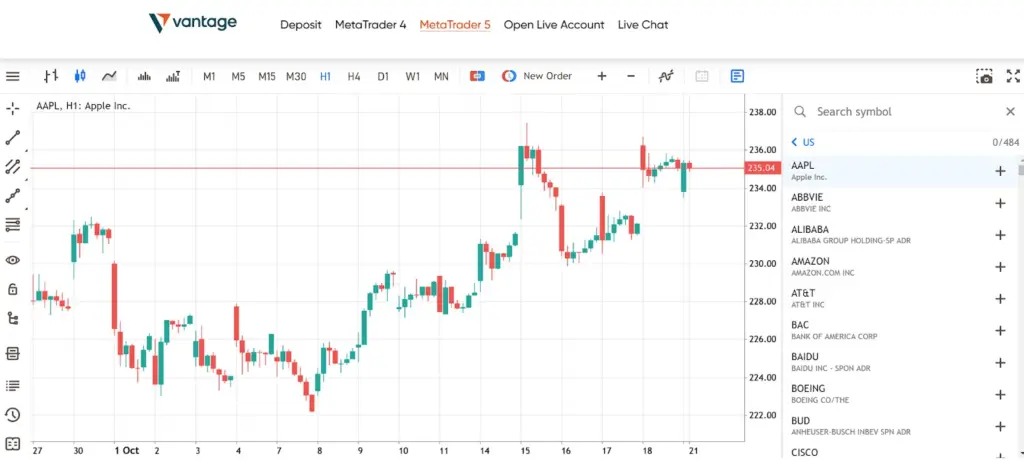
The screenshot above shows our web-based version of MT5. In the toolbar at the top, you can see several symbols that let you choose between different chart types (bar, candlestick, or line) as well as time frames.
On the right of the screen is Market Watch, which can be toggled on or off by clicking the rightmost button in the top toolbar. Here, you can search for the asset you want to trade.
Assets are classified into categories such as commodities, stocks, forex, bonds, and ETFs. Click the asset you want to trade to open the price chart, which will appear on the main screen.
How to plot indicators on MT5 WebTrader
Once the asset you want has been selected, you can perform technical analysis by inserting indicators on the price chart.
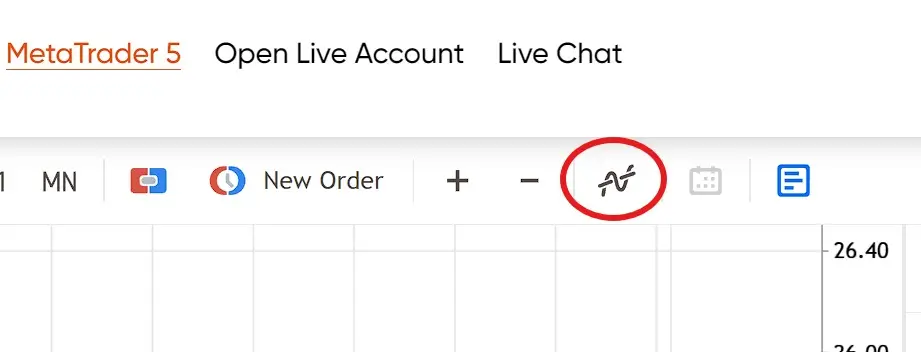
Click the “Add Indicator” in the top toolbar, circled in red. You can also use Ctrl+I. The list of technical indicators will pop up.
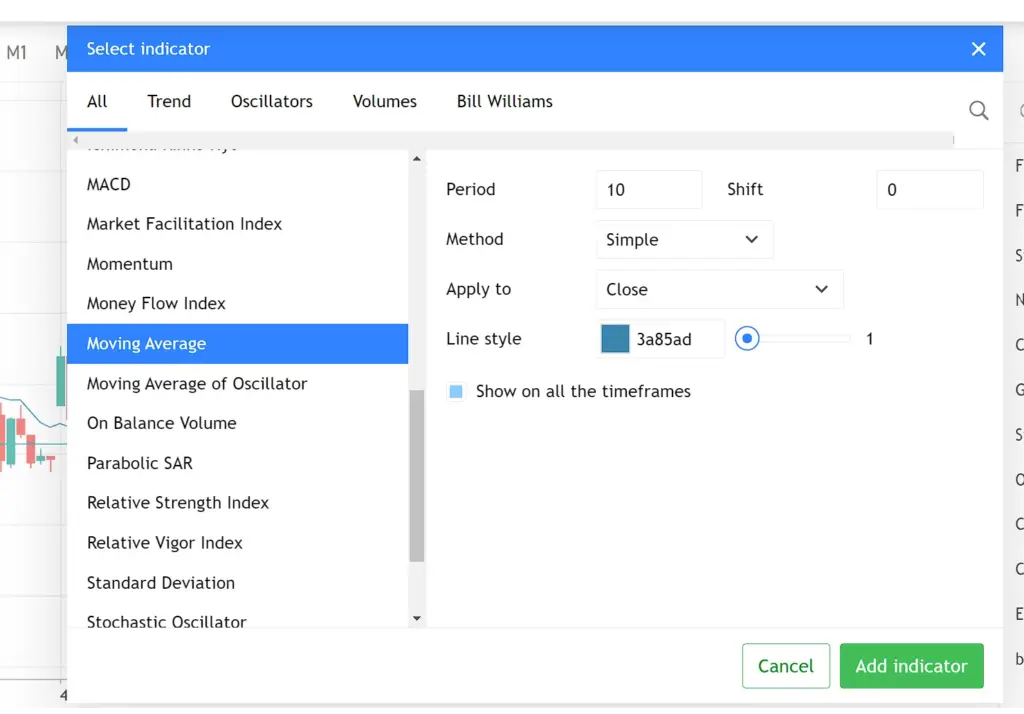
Select the indicators you want to use from the list, adjust the parameters if necessary, and then click “Add Indicator”. This will display the selected technical indicator on your price chart.
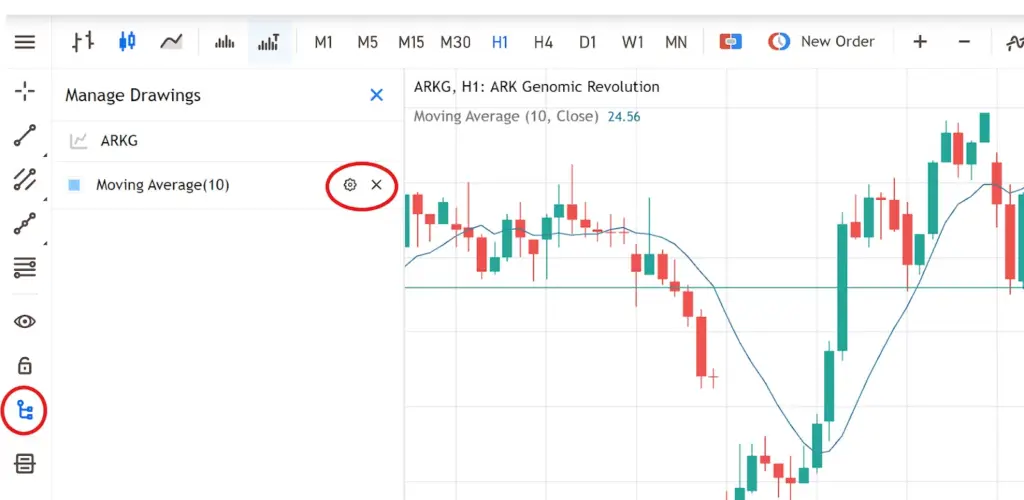
To change or remove indicators and drawings, refer to the toolbar on the left-hand side. Click the “Manage Drawings” icon to bring up a list of all current drawings.
Now you can click the gear icon to adjust your technical indicator parameters, or click the X to remove it from the price chart.
How to buy and sell on MT5 WebTrader
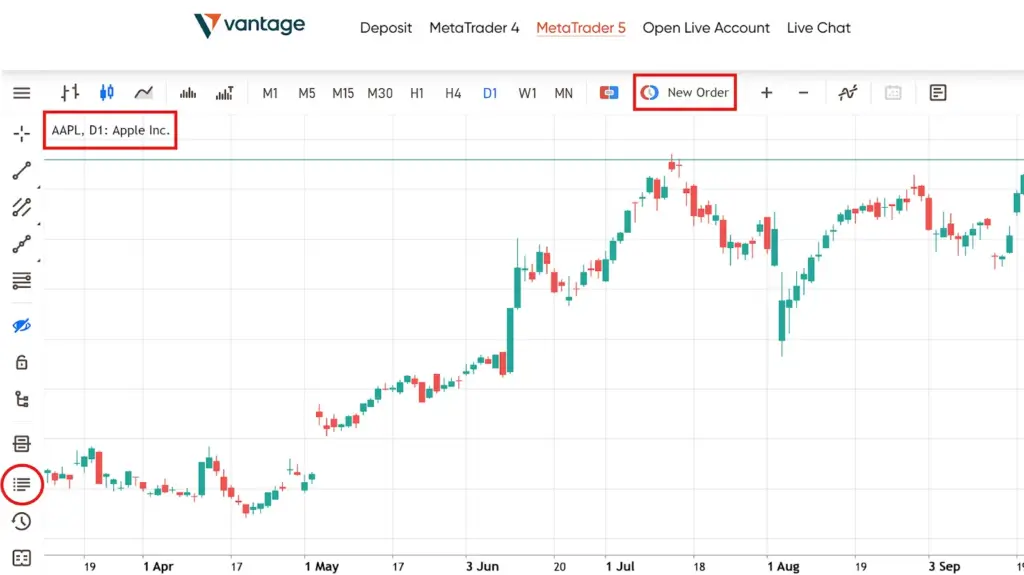
In the screenshot above, we’ve called up the AAPL price chart in preparation to make a trade.
We start by clicking the “New Order” button in the top toolbar to bring up the order screen on the left.
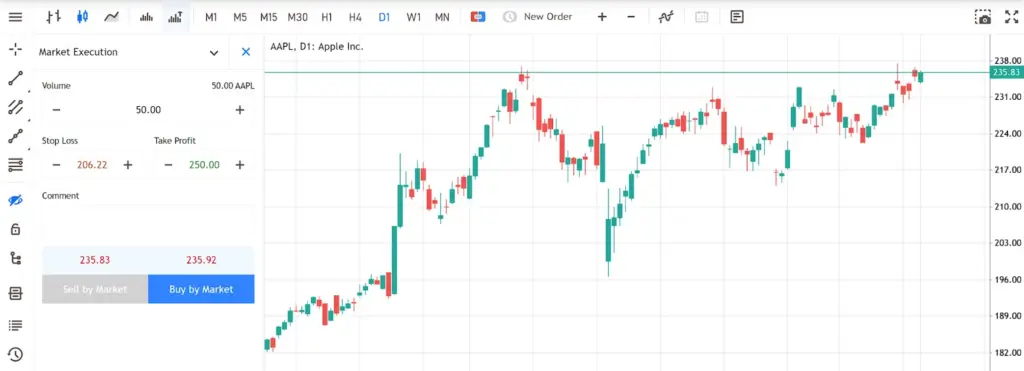
Select your trade volume, and set your Stop Loss and Take Profit levels by entering the relevant values into the respective fields. Here, we’ve entered 50 shares with a stop-loss at 206.22 and a take-profit at 250.
This means we’re buying 50 AAPL shares at the current market price. If the share price falls below 206.22, the Stop Loss will trigger, selling off our shares to prevent further losses. If the share price rises to 250, the Take Profit will trigger, and we will sell our shares to realise a profit.
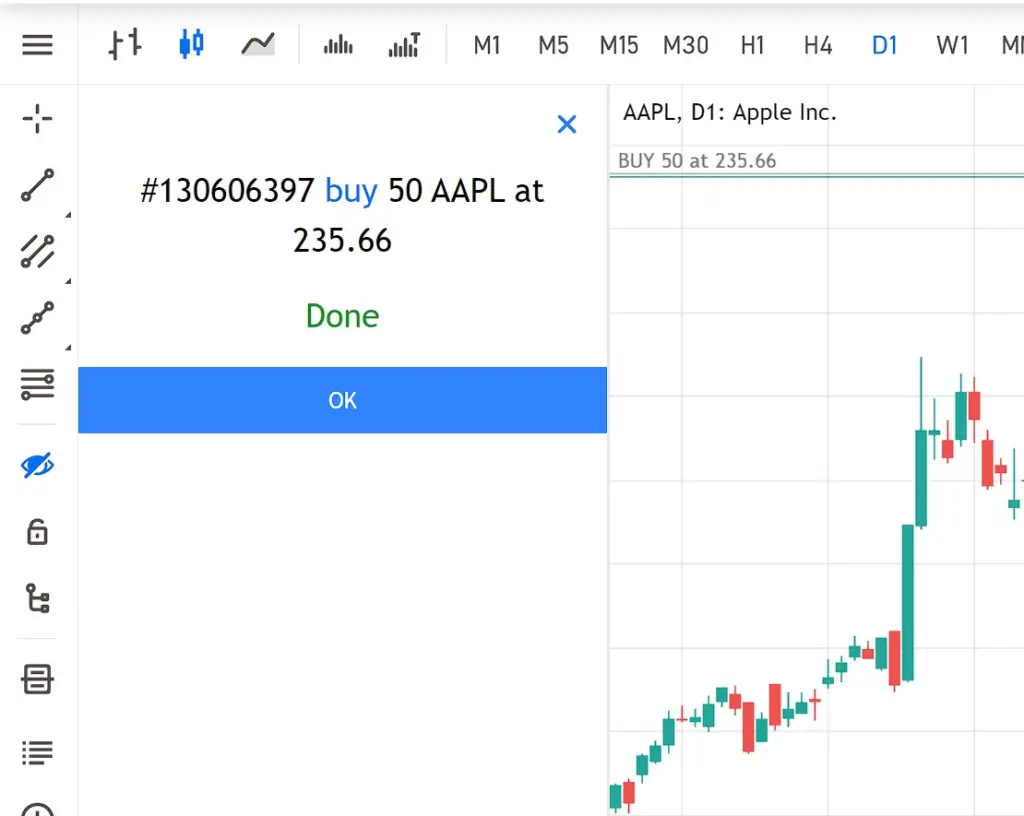
Click “Buy by Market” to execute the trade. You’ll get a confirmation screen.
How to manage your trades on MT5 WebTrader
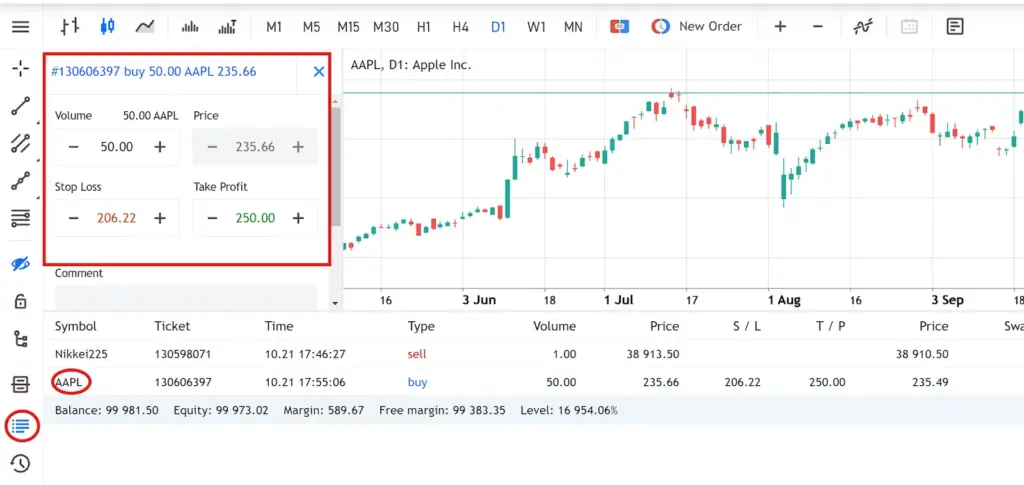
Once you’ve entered your trade, you can call it up by clicking the “Trade” button on the left-hand toolbar. All active trades will be displayed at the bottom of the screen.
Click the symbol of the trade you want to manage; in this case, it’s the AAPL trade. This will open a trade window, as indicated by the red square in the screenshot.
Here, you can adjust your Stop Loss and Take Profit levels as needed.
Power your trades with MT5 at Vantage
In this article, we’ve just scratched the surface of what MT5 can do. As a powerful, multi‑asset platform, MT5 offers far more capabilities than can be covered in a single MetaTrader 5 guide, especially in the desktop app.
Nonetheless, we hope this article has provided a solid foundation for understanding the important role that trading with MetaTrader 5 can play in your investing journey. Whether you’re a beginner investor just starting out or are an experienced trader looking to up your trading game, MT5 has plenty to offer.
But don’t just take our word for it. Register for a Vantage account to start exploring MT5. Trade CFDs on the world’s most popular instruments, such as stocks, gold, bonds, and forex, at greater capital efficiency with up to 500:1 leverage, enjoy transparent pricing, low fees, and tight spreads, and power your trades with sophisticated tools on our MT5 trading platform.
Sign up to start experiencing the Vantage advantage now!
References:
- “MetaTrader 5 Trading Platform – MetaTrader 5”. https://www.metatrader5.com/en/trading-platform. Accessed 22 Oct 2025.
- “MetaQuotes wins two prestigious awards at the London Summit – MetaQuotes”. https://www.metaquotes.net/en/company/news/5420. Accessed 22 Oct 2024.
- “Trading and orders in MetaTrader 5 – MetaTrader 5”. https://www.metatrader5.com/en/trading-platform/trading. Accessed 22 Oct 2025.
- “Trading Signals in MetaTrader 5 – MetaTrader 5”. https://www.metatrader5.com/en/trading-platform/trading-signals. Accessed 22 Oct 2025.
- Algorithmic Trading – MetaTrader 5”. https://www.metatrader5.com/en/automated-trading. Accessed 22 Oct 2025.